The Core Idea: Zero-Knowledge
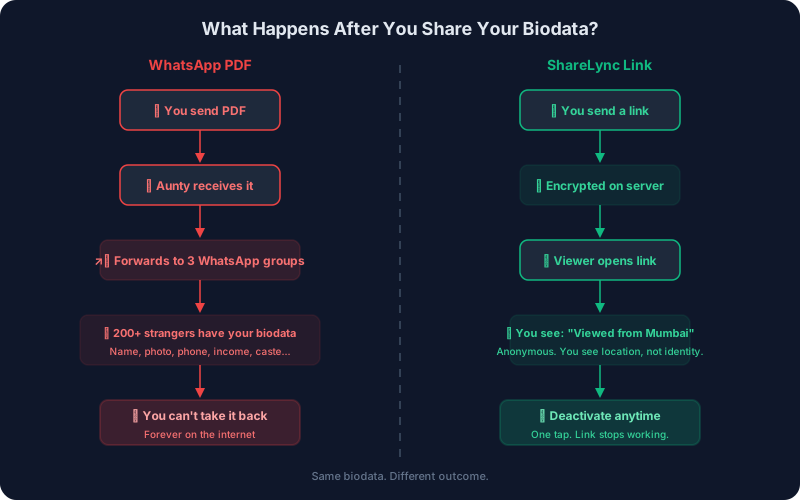
ShareLync uses a zero-knowledge architecture. This means your biodata is encrypted on your phone or browser before it leaves your device. Our servers store only encrypted data — random-looking bytes that are mathematically unreadable without your unique link.
We literally cannot read your biodata. Not our engineers, not our database administrators, not anyone with access to our servers. This is not a policy decision ("we promise not to look") — it's a mathematical guarantee.
The Encryption: AES-256-GCM
Every biodata is encrypted using AES-256-GCM — the same encryption standard used by:
- ✓ US Government (classified information)
- ✓ Banks (financial transactions)
- ✓ Signal (encrypted messaging)
- ✓ WhatsApp (end-to-end encryption)
AES-256 has never been broken. There is no known attack that can crack it. Even with every computer on Earth working together, brute-forcing a single AES-256 key would take longer than the age of the universe.
How It Works: Step by Step
Step 1: You create a biodata
You fill in your details in the app — name, education, family, photos. This data lives on your phone only.
Step 2: A unique slug is generated
The app generates a random, unique identifier (e.g., rahul-K9x2). This slug becomes part of your shareable link and serves as the encryption key.
Step 3: Encryption happens on YOUR device
Before any data leaves your phone, the app:
slug→ PBKDF2 →256-bit AES key100,000 iterationsyour biodata (JSON)→ AES-GCM →encrypted blobslug→ SHA-256 →public hashfor database lookupStep 4: Only the encrypted blob is uploaded
The encrypted data is stored in Google Cloud. The slug (encryption key) is never sent to our servers. It stays on your device and in the shareable link.
Step 5: Viewer opens the link
When someone opens your link, their browser extracts the slug from the URL, fetches the encrypted blob from our server, and decrypts it locally in the browser. The decryption happens on the viewer's device — not on our server.
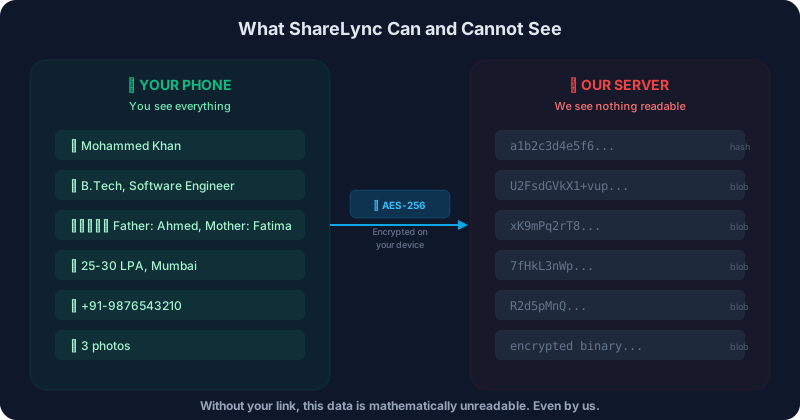
What Our Servers See (and Don't See)
| Data | We CAN see | We CANNOT see |
|---|---|---|
| Your biodata content | Encrypted blob (random bytes) | Name, education, family, income, religion, photos |
| Your encryption key (slug) | SHA-256 hash (for lookup only) | The actual slug / link |
| Who viewed your biodata | Hashed device ID + approximate city | Viewer name, phone, identity |
| Your phone number | HMAC hash (for account recovery) | Your actual phone number |
| Your photos | Encrypted photo files | Actual images |
What a Database Record Actually Looks Like
This is what your biodata looks like on our server. This is a real document structure from our database:
{
  "publicHash": "a1b2c3d4e5f6...64 chars...",
  "ownerId": "user-id-here",
  "encryptedData": "U2FsdGVkX1+vupppZksvRf5pq5g...",
  "viewCount": 12,
  "isLive": true,
  "createdAt": "2026-04-01T10:30:00Z",
  "updatedAt": "2026-04-05T14:20:00Z"
}
The encryptedData field is the only place your biodata exists — and it's unreadable gibberish without your link. Everything else is metadata for the system to function.
Photo Encryption
Your profile photos are encrypted separately using AES-256-GCM at the file level. Each photo is encrypted on your device before upload. The encrypted files are stored in cloud storage — even if someone gained access to our storage, they would see only encrypted binary data, not your photos.
Additional Security Measures
PBKDF2 Key Derivation
Your slug is not used directly as the encryption key. It goes through PBKDF2 with 100,000 iterations of HMAC-SHA256, producing a derived 256-bit key. This makes brute-force attacks computationally infeasible.
Random IV per Encryption
Every encryption operation uses a fresh 12-byte random Initialization Vector (IV). This means encrypting the same biodata twice produces completely different ciphertext.
GCM Authentication Tag
AES-GCM includes a 128-bit authentication tag that detects tampering. If anyone modifies the encrypted data on our server, decryption will fail — the data cannot be silently corrupted.
Phone Hash with HMAC
For account recovery, we store an HMAC-SHA256 hash of your phone number — not the phone number itself. This allows us to verify your identity without knowing your number.
Database Security Rules
Our database rules enforce strict access control. Only the profile owner can write to their profile. Viewers can read the encrypted blob but cannot modify it. These rules are enforced server-side by Google.
No Analytics on Minors
In compliance with DPDPA 2023 (India), we do not collect analytics data from users under 18. The app is intended for adults only.
What We're Honest About
No system is perfect. Here's what we're transparent about:
Link sharing is your responsibility
If you share your link with someone, they can view your biodata. Share it only with people you trust. You can deactivate the link at any time.
Screenshots are possible
We have screenshot protection on the mobile app, but a determined viewer could still capture content. This is a limitation of all digital content.
Link preview cards are unencrypted
If you enable WhatsApp link previews, a minimal public card (name, city, profession, photo) is stored separately in unencrypted form. You can disable this feature anytime.
Viewer location is approximate
We derive approximate viewer location from IP addresses for the view tracking feature. This data is anonymous (device hash, no identity) and city-level accuracy varies.
Verify It Yourself
We believe security should be verifiable, not just claimed. Here's how you can verify our encryption:
1. The Link Test
Open any ShareLync biodata link. Delete one character from the URL. The page shows an error — not because we blocked you, but because the decryption key is wrong. The data is still there on our server, but it's mathematically unreadable.
2. Browser DevTools
Open a biodata link, then check the Network tab in DevTools. The response from our server contains only encrypted data. The decryption happens in JavaScript on your browser — you can see the crypto.subtle.decrypt call.
3. Decompile the App
The Android app can be decompiled to verify our encryption implementation. We use standard javax.crypto.Cipher with AES/GCM/NoPadding — no custom or proprietary encryption.


Last updated: April 2026 · Questions? Contact security@sharelync.app