
How to Share Your Biodata Without Putting Your Phone Number on It (2026)
Every biodata has the same last line: a phone number. It feels necessary. How else will a family reach you? But that one line is the biggest privacy problem in the whole document.
The moment your biodata is forwarded, your number goes with it. A biodata meant for one family reaches ten. Within a week, unknown numbers call at odd hours. Some are genuine. Many are not. You cannot take the number back, because it now sits in strangers' phones and forwarded PDFs you will never see.
There is a better way. You can share a biodata that families can respond to, and keep your number private until you decide a family is worth a reply. This guide shows how.
The Problem With a Phone Number on a Biodata
A phone number on a forwarded biodata has three costs.
- You lose control. Once forwarded, the number spreads. You cannot delete it from other phones.
- You get spam. Marketing calls, wrong matches, and time-wasters all reach the same number.
- You cannot filter. Everyone who sees the biodata can call. You cannot decide who reaches you first.
The number is there so families can express interest. But you do not need to publish it to receive interest. You only need a way for a family to reach you that you control.
The Link Way: Share a Biodata, Receive Private Inquiries
ShareLync replaces the printed number with a private link. You create your biodata, share a link like sharelync.app/p/your-name, and the link carries no phone number.
When a family likes your biodata, they do not call a number on a PDF. They tap Send Inquiry on your link. They share their own name and contact, and often attach their own biodata. You review every inquiry in the app, and you reach out only when a family is a fit.
Your number stays private. The family shares theirs first. You stay in control of the first move.
How an Inquiry Works, Step by Step
- You share your biodata link. No phone number on it. Send it on WhatsApp to the families you choose.
- A family views it and taps Send Inquiry. They add their name and contact number. If they have a biodata, they attach it in one tap.
- You get a notification. ShareLync tells you a family sent an inquiry. Their details wait for you in the app.
- You review it in the Inquiries screen. You see the family's name, their contact, their note, and their biodata if they attached one.
- You reply when it is a fit. Tap WhatsApp to message them. Or mark the inquiry as contacted, or dismiss it. Your number reaches them only when you choose.
The Inquiries Screen: Your Leads in One Place
A notification is easy to lose. Swipe it away, and the family is gone. ShareLync fixes that with a permanent Inquiries screen in the app.
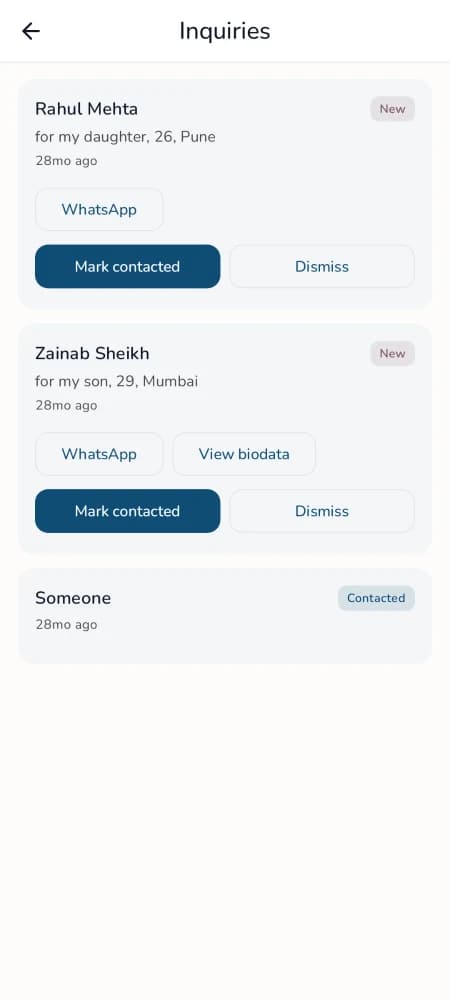
The Inquiries screen. Every inquiry stays here, with the family's details, their biodata if attached, and a status you set.
Every inquiry you receive stays there:
- The family's name, or "Someone" if they stayed private.
- Their contact number, so you can reach out on WhatsApp.
- Their note, if they wrote one.
- Their biodata, if they attached it. You open it with one tap.
- A status you set: contacted or dismissed.
No lead falls through the cracks. You work through inquiries at your own pace, not in the panic of a missed call.
You Often Get a Biodata Back
Families exchange biodatas both ways. That is how the search actually works.
When a family sends you an inquiry, they can attach their own biodata in one tap. So you do not just get a phone number. You get their full biodata to review before you reply. You see their education, family, and background first, and you decide if it is worth a conversation.
Two biodatas, exchanged privately, before one phone call. That is a calmer, more respectful start than a cold phone call to a number on a PDF.
Why This Is Safer
| Number on a PDF | Private link + inquiries | |
|---|---|---|
| Who can reach you | Anyone who sees the forward | Only families you reply to |
| Your number spreads | Yes, to every phone | No, it stays private |
| Spam calls | Common | None. You make the first move |
| You get their biodata first | No | Often, attached to the inquiry |
| You can stop it | No | Yes. Pause or delete the link anytime |
Because the biodata is a link, you stay in control after you share it. You can update a detail, pause the link, or turn it off the day the marriage is fixed. A forwarded PDF gives you none of that. For more on that control, read how to share a biodata without losing control.
A Note on Respect and Privacy
An inquiry is a family reaching out about a biodata, not a message to a person. The family shares their details and their biodata so you can review the match. Nothing is shared with anyone you do not reply to. You decide who gets your number, and when. This keeps the process private and respectful for both families.
If you are on the other side, and you want to respond to a biodata you liked, read how to express interest in a biodata without the awkward phone call.
How to Set This Up
Step 1: Create your biodata
Open ShareLync on your phone. Fill in your details. Pick a respectful template. Do not add your phone number to the biodata itself.
Step 2: Share your link
Get a link like sharelync.app/p/your-name. Send it on WhatsApp to the families you choose. The link carries no number.
Step 3: Receive inquiries in the app
When a family is interested, they send an inquiry with their contact and often their biodata. You review every inquiry in the Inquiries screen.
Step 4: Reply on your terms
Open an inquiry, review the family's biodata, and reach out on WhatsApp when it is a fit. Your number stays private until then.
Create your biodata on ShareLync
Frequently Asked Questions
How do families reach me if my biodata has no phone number?
They tap Send Inquiry on your link. They share their own name and contact, and often their biodata. You review the inquiry in the app and reply on WhatsApp when a family is a fit.
Does the other family see my phone number?
No. Your number stays private. The family shares theirs first. You reach out only when you choose, so you make the first move.
Where do I see the inquiries I receive?
In the Inquiries screen in the ShareLync app. Every inquiry stays there with the family's name, contact, note, and their biodata if they attached one. You mark each one contacted or dismissed.
Can I still get their biodata, not just a number?
Yes. When a family sends an inquiry, they can attach their own biodata in one tap. You review it before you reply.
Is this private and respectful?
Yes. An inquiry is about a biodata, not a message to a person. Nothing is shared with families you do not reply to. You control who gets your number.
Ready to share a biodata that keeps your number private? Create yours on ShareLync. Share a link, receive private inquiries, and reply on your terms.