Biodata Format with Photo — Placement, Tips & Privacy Guide (2026)
Your biodata is often the first impression a family gets of you. And nothing shapes that first impression more than your photo. A well-chosen, well-placed photo can make your biodata feel personal and genuine. A poor one — blurry, outdated, or awkwardly cropped — can undermine everything else on the page.
But photos also carry the highest privacy risk of anything in your biodata. Your name and job title are just text. Your photo is you. Once it leaves your phone as a PDF, you have no control over where it ends up, who saves it, or how it gets used.
This guide covers everything you need to know about including photos in your marriage biodata: whether you should include one, what kind of photo works, where to place it, how many to include, what to avoid, and — critically — how to share photos safely so they don't end up in the wrong hands.
Should You Include a Photo in Your Biodata?
The short answer for most families: yes. In the South Asian matrimonial process, a biodata without a photo often gets skipped. Families want to see who they're considering, and a photo adds a layer of genuineness that text alone can't provide.
That said, there are valid reasons some families choose not to include photos initially:
- Privacy-first approach — Some families prefer sharing photos only after an initial conversation, once there's mutual interest. This is perfectly reasonable and increasingly common.
- Community norms — In certain communities, it's customary to exchange photos separately after the biodata has been reviewed and there's preliminary interest.
- Personal preference — Some individuals simply aren't comfortable having their photos circulate widely among strangers.
If your family or community expects photos in the biodata, include them. If you're uncomfortable with wide circulation, consider using a platform that lets you control who sees your photos and revoke access later — rather than embedding them in a PDF that can be forwarded indefinitely.
Make it in the ShareLync app
Add photos to a biodata you can update
Choose your photos in ShareLync and share one link. Update the photos or pause the link from the app.
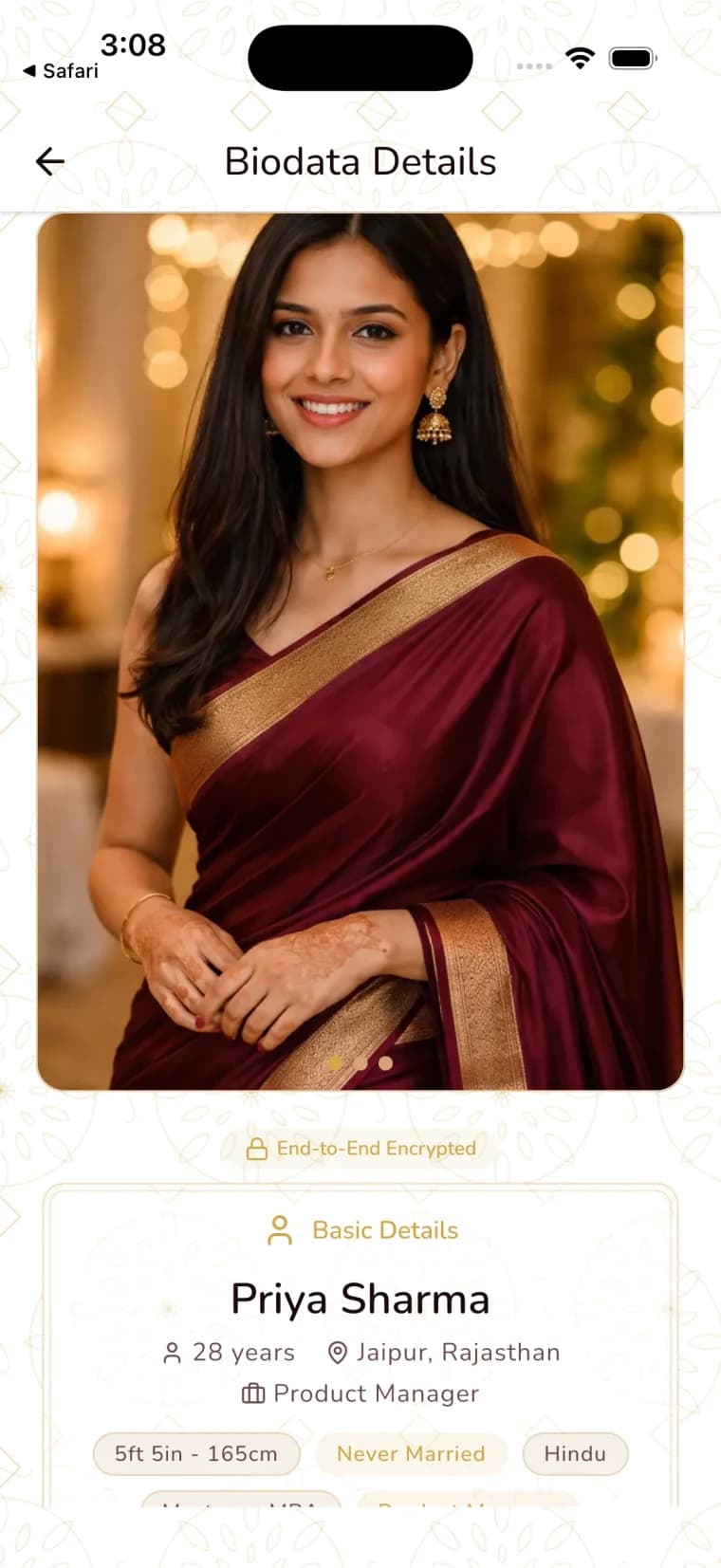


What Kind of Photo Works Best
Not every photo belongs in a biodata. The goal is to look like yourself — approachable, well-presented, and genuine. Here's what works.
The Basics
- Recent photos — Taken within the last 6 to 12 months. Using a five-year-old photo creates a trust problem from the very first meeting.
- Well-lit — Natural daylight is your best friend. Step near a window or go outside. Avoid harsh overhead lighting or dim indoor shots.
- Solo photos — This is your biodata, not a group introduction. Every photo should be just you.
- Natural expression — A genuine, relaxed smile works better than a stiff pose or an overly serious look.
- Clear and sharp — No blurry, pixelated, or heavily cropped images. If you need to zoom in significantly, it's not the right photo.
Dress and Presentation
- Formal or semi-formal — Think of what you'd wear to a family gathering or a nice dinner. You don't need a suit and tie, but avoid overly casual clothing like gym wear or graphic tees.
- Neat and well-groomed — Clean clothing, tidy hair, minimal but tasteful accessories.
- Background matters — A plain or uncluttered background keeps the focus on you. A clean wall, a park, or a simple indoor setting works well. Avoid busy backgrounds with other people, brand logos, or clutter.
Photo Quality
You don't need a professional photographer, though it doesn't hurt. A modern smartphone camera in good lighting produces excellent results. What matters more than equipment is lighting, framing, and looking natural.
If you're using a phone camera:
- Use the rear camera (higher quality) with someone else taking the photo, rather than a selfie
- Turn on portrait mode for a soft background blur
- Hold the phone at eye level or slightly above
- Take multiple shots and pick the best one
Photo Placement in Your Biodata
Where you place your photo affects how the entire biodata reads. There are three common layouts, each with its own feel.
Top-Right Corner (Traditional)
This is the most widely used placement in South Asian biodatas. The photo sits in the upper-right corner of the first page, with personal details listed alongside it on the left. It's clean, expected, and familiar to most families.
Best for: Families who want a conventional, widely accepted format.
Top-Center (Modern)
The photo is centered at the top of the biodata, often larger than in the traditional layout, with all text flowing below it. This creates a more profile-like appearance, similar to what you'd see on social media or professional platforms.
Best for: Candidates who want a contemporary, polished look.
Separate Photo Page
Some families include a separate page — usually the last page — dedicated entirely to photos. The main biodata pages contain only text, and the photo page includes 2-4 images in a grid layout.
Best for: Families who want to keep the text clean and uncluttered, or who want to include multiple photos without disrupting the biodata layout.
How Many Photos Should You Include?
Two to three photos is the sweet spot. Enough to give a well-rounded impression, but not so many that it feels like a photo album.
Recommended Photo Set
- One close-up portrait — Head and shoulders, facing the camera, good lighting. This is your primary photo.
- One full-length photo — Standing, well-dressed, showing your overall appearance. Can be at an event, outdoors, or in a studio setting.
- One casual or natural photo — Something that shows personality. At a family event, traveling, engaged in a hobby. This photo humanizes the biodata beyond formal poses.
What About More Than Three?
You can include up to four, but more than that starts to feel excessive. Remember, the biodata is an introduction, not a portfolio. If a family is interested, they'll see plenty more photos later.
What to Avoid in Biodata Photos
Some photo choices are surprisingly common and almost always work against you. Here's what not to do.
- Group photos — Even if you circle yourself or add an arrow, it's distracting and looks unprofessional. Always use solo photos.
- Heavily filtered selfies — Filters that change your skin tone, face shape, or add effects make you look different from reality. This creates problems at the first meeting.
- Old photos — If you've changed significantly in the last year — different hairstyle, weight change, new glasses — use current photos. Outdated photos feel deceptive, even if that's not the intention.
- Gym or workout selfies — Even if you're proud of your fitness, gym mirror selfies read as inappropriate for a marriage biodata.
- Car selfies — A surprisingly common choice that rarely photographs well. The lighting is usually harsh, the angle is awkward, and it adds no useful context.
- Sunglasses — Families want to see your face. Photos with sunglasses, even stylish ones, feel like you're hiding.
- Heavy editing — Retouching blemishes is fine. Dramatically altering your appearance is not. If you wouldn't be recognized from your biodata photo at a first meeting, it's too edited.
- Party or nightlife photos — Even if you look great, the context sends the wrong signal for a marriage biodata.
- Photos with other people cropped out — If there's a visible arm, shoulder, or hand of someone cropped from the frame, it looks careless.
Photo Tips for Men
Men's biodata photos tend to fall into a few common traps. Here's how to avoid them.
- Skip the car and bike photos. Nobody is marrying your vehicle.
- Smile naturally. The serious, brooding look rarely translates well in a biodata context. A warm, approachable smile makes a better impression.
- Wear a collared shirt or kurta. It doesn't need to be a suit, but a step above a t-shirt shows you've made an effort.
- Grooming matters. A neat haircut, trimmed beard (if you have one), and clean appearance go a long way.
- Avoid excessive accessories. A watch is fine. Chains, rings on every finger, and flashy sunglasses are distracting.
- Show your face clearly. No caps, no sunglasses, no photos from far away where your face is a small part of the frame.
Photo Tips for Women
Women face some additional considerations, particularly around cultural expectations and privacy concerns.
- Modest but confident. Your outfit should reflect your personal style while being appropriate for the audience. Most families respond well to traditional or semi-formal attire, but the key is looking comfortable and confident.
- Light, natural makeup. Heavy or dramatic makeup can look very different from everyday appearance. Subtle, everyday makeup photographs well and avoids the "looks different in person" problem.
- Hair neatly styled. Doesn't need to be elaborate — just clean and intentional.
- Be especially careful about photo privacy. Women's photos from biodatas are more frequently misused than men's. Consider sharing photos through a platform with access controls rather than embedding them in a PDF.
- Include at least one traditional outfit photo if possible. If your family or the families you're considering are traditional, a photo in a saree, salwar kameez, or similar traditional attire can resonate well. But this is optional — wear what represents you.
Cultural Considerations
Photo expectations vary significantly across communities. What works in one cultural context may not work in another.
Traditional vs. Modern Families
- Traditional families often expect formal photos — studio-style portraits, traditional attire, minimal jewelry but well-presented. They may prefer conservative dress and a serious or gentle expression.
- Modern families tend to be more relaxed about photo style. Casual-elegant photos, outdoor shots, and natural smiles are perfectly acceptable.
Community-Specific Norms
- Some communities expect women to be photographed in traditional attire specific to that community.
- In certain conservative families, photos are shared only after initial interest is established, not in the biodata itself.
- Some families prefer separate photo exchange — the biodata has no photos, and images are shared later through a family member or matchmaker.
Diaspora Families
Families in the US, UK, Canada, and Australia often blend expectations. The biodata format may be traditional, but photo styles tend to be more relaxed. A professional headshot or a well-taken casual photo typically works well across cultural boundaries.
The best approach: Know your audience. If you're sharing with a traditional family, lean formal. If the family is modern, a natural photo works great. When in doubt, err on the side of slightly more formal — it's rarely a negative.
The Privacy Problem with Photos in PDFs
Here's the part most biodata guides skip entirely: what happens to your photos after you share them.
When your biodata is a PDF, your photos are embedded files. Anyone who receives the PDF can:
- Save your photos to their device with a single tap
- Forward the entire PDF to anyone, with your photos included
- Extract the images separately from the document
- Upload your photos to other platforms — dating apps, social media, fake profiles
- Share them in WhatsApp groups where strangers browse and screenshot freely
This is not a theoretical risk. Photo misuse from matrimonial biodatas is a documented problem. Once your photo is in a PDF, it's out of your control permanently. You can't recall it, you can't delete it from other people's devices, and you can't even know who has it.
For women especially, this is a serious concern. Photos from biodatas have been found on fake social media profiles, used in catfishing, and shared in inappropriate online spaces. The families sharing these biodatas had no idea.
For more on why PDF sharing is risky, read our post on why you should stop sending biodata PDFs on WhatsApp.
How ShareLync Handles Photo Sharing
- Choose what to share. Review the Photos setting for each sharing view before sending its link.
- Update your photos. Families who open an active link see your current photos.
- Pause the link. Stop access through a sharing view when you no longer want that link to work.
- Check view activity. Review viewing activity in the app. It does not prove a viewer's identity.
Privacy note: A recipient may capture the screen or save information. Pausing a link cannot remove external copies. Share only photos you are comfortable showing.
Biodata Photo Size and Format
If you're creating a biodata yourself (in Word, Canva, or a similar tool), here are practical specs:
- Resolution: At least 600 x 800 pixels for a passport-style photo, 1200 x 1600 for a full-length shot. Higher is fine; lower gets blurry when printed.
- File size: Keep each photo under 2 MB for reasonable PDF file size. If your PDF becomes 20 MB because of large images, families may have trouble downloading it.
- Aspect ratio: 3:4 or 4:5 for portrait photos. Avoid landscape (wide) photos in a biodata — they waste vertical space and look awkward next to text.
- Format: JPEG for photographs (good quality at smaller sizes), PNG only if the image has transparency (unlikely for a portrait).
If you're using ShareLync, you don't need to worry about any of this. The app handles photo sizing, formatting, and optimization automatically.
Frequently Asked Questions
Should I add a photo in my biodata?
Yes, in most South Asian communities, a photo is expected and strongly recommended. A biodata without a photo is more likely to be skipped. However, if your family prefers to share photos separately after initial interest, that's also a valid approach. The key is to make sure photos are shared at some point during the initial evaluation — families rarely move forward without seeing a photo.
What is the right biodata photo size?
For a standard biodata, a passport-style portrait should be at least 600 x 800 pixels. For full-length photos, aim for 1200 x 1600 pixels. Keep individual image file sizes under 2 MB to prevent the PDF from becoming too large to share easily.
How many photos should I add to my marriage biodata?
Two to three photos is ideal. Include one close-up portrait, one full-length photo, and optionally one casual photo that shows personality. More than four starts to feel excessive for a biodata.
What kind of photos should I avoid?
Avoid group photos, heavily filtered selfies, old photos (more than a year), gym selfies, car selfies, photos with sunglasses, and any images that are blurry, dark, or heavily edited. Your biodata photo should look like you on a good, normal day.
Where should the photo go in a biodata?
The three common placements are: top-right corner (most traditional and widely used), top-center (modern profile-style), or a separate photo page at the end. Any of these works — choose based on your design preference and cultural context.
Is it safe to include photos in a biodata PDF?
This is where caution is needed. Photos in a PDF can be saved, forwarded, extracted, and misused by anyone who receives the file. You have no control after sharing. A ShareLync link lets you update photos or pause access through that link. Recipients may still capture the screen or save information.
Should men and women follow different photo guidelines?
The core advice is the same — recent, clear, well-lit, natural photos. But women should be especially cautious about photo privacy, as misuse of women's biodata photos is more commonly reported. Men should avoid the car-selfie and gym-photo traps. Both should dress appropriately for the cultural context of the families they're sharing with.
The Bottom Line
A good photo makes your biodata personal, genuine, and memorable. A bad photo — or a carelessly shared one — can create problems that range from a missed connection to a serious privacy violation.
Choose recent, well-lit, natural photos that look like you. Place them thoughtfully. Include two to three that tell a complete visual story. And think carefully about how you share them.
If you're sending photos in a PDF, know that you're giving up all control the moment you hit send. If that concerns you, switch to a platform that gives you the control back.
Your photos are personal. Share them on your terms.
Create your biodata in the ShareLync app. Review the Photos setting on each view before sharing.